Step 01
Enter a message.
Place one device between you. Type a short message on your side of the shared screen.
Technology for human connection
LexiFlip gives people who are Deaf or hard of hearing another way to exchange short messages in person. Type a message and show it clearly on a shared screen.
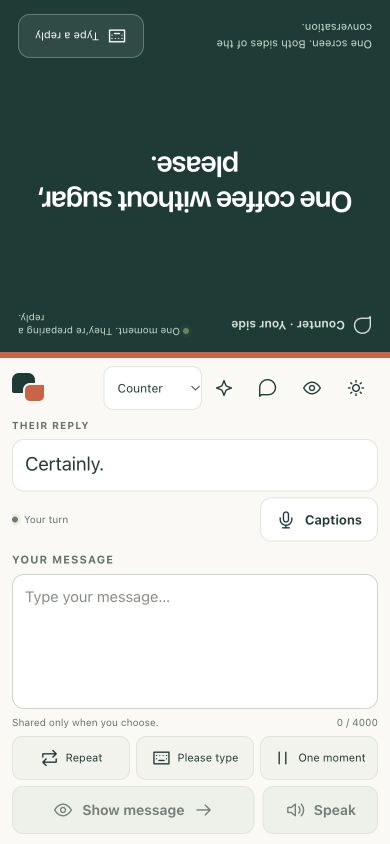
See the conversation unfold
Place the screen between you. Your message faces them; their reply comes back to you. It’s a small flip that makes room for both people.
How LexiFlip works
Built for the small, everyday moments when seeing a message makes a conversation easier.
Step 01
Place one device between you. Type a short message on your side of the shared screen.
Step 02
Counter Mode faces your message toward the other person, so both sides can read comfortably.
Step 03
The other person can type a reply from their side. Clear the conversation when you are finished.
Everyday possibilities
A flexible way to add written communication to a face-to-face exchange. Explore how it could work in your setting.
Make an order, check a detail, or share a quick reply across the counter.
Show a question clearly and give the other person space to respond in writing.
Ask about a product or make a request using a screen you can both read.
Thoughtful engineering
Clear views today. Careful measurement as we develop the next generation of local speech.
Open LexiFlip in your browser for shared-screen messages and typed replies. There is no app installation needed to try Counter Mode.
The native speech path requires on-device recognition by default. Device and language support are checked before capture; typed replies remain available.
Our INT8 model-preparation and qualification framework helps evaluate smaller local models, with timing diagnostics to support evidence-based development.
Development status: native speech currently uses OS-managed recognition. Custom quantized model integration and an under-300ms mobile runtime are targets under qualification; physical-device benchmarks are pending.
Clear choices
A shared screen makes messages visible to the people around it. Use LexiFlip’s hide and clear controls when a conversation is finished or needs discretion.
On supported native devices, speech recognition requires a local path by default. If local recognition is unavailable, use typing. Network-assisted recognition requires an explicit opt-in and may involve the device’s speech provider.
Availability and processing depend on the device, operating system, language, and selected mode. Contact us to discuss privacy or accessibility requirements for your setting.
Ask about your requirementsStart a conversation
Try the public web experience, or talk with us about the needs of your team and the people you serve.
Available now
Free to try. Open the shared-screen experience directly in your browser.
Let’s explore
Tell us about your setting. We can discuss a pilot, requirements, and how you would evaluate the experience.
People behind the product
Building practical tools that make face-to-face communication easier to follow.
Founder & Tech Lead
Pradyumn leads product vision, technical architecture, and deployment at Lexiverse Systems, bringing full-stack engineering to approachable communication tools.
Co-founder and Chief Operating Officer
Aadya leads operations, financial planning, and business strategy. Her medical domain experience informs the team’s work and its conversations with potential partners.
Build with us
Interested in a pilot, a partnership, or the work behind LexiFlip? We’d like to hear about your setting and what you need.
Let's talk
Tell us about your organization, the people you serve, and what you'd like to explore. We'll follow up directly.
Enterprise partnerships and pilot conversations go straight to the Lexiverse Systems team.